Business Critical Oracle Workloads have stringent IO requirements and enabling, sustaining, and ensuring the highest possible performance along with continued application availability is a major goal for all mission critical Oracle applications to meet the demanding business SLAs.
This blog is an attempt to investigate the relationship between Nutanix vDisks, Volume Groups (VG) & SCSI Controllers and how is fundamentally different when compared to VMware vmdk’s & PVSCSI Controllers.

Disclaimer – This is not an official Nutanix blog – just my private investigation in my lab environment, to get a better understanding how Nutanix platform works under the covers, having worked in the VMware space for 12+ years as the Global Oracle Practice Lead and in the Nutanix space as an Sr OEM System Engineer for the past couple months.
Nutanix Native vDisks & Volume Groups (VG)
You can create vDisks for VMs on Nutanix in the following ways:
- Nutanix native vDisks
- Nutanix Volume Groups (VG)
Nutanix Native vDisks
The Nutanix native vDisk option simplifies VM administration because it doesn’t require Nutanix VGs. When you create a VM using Prism, add more vDisks to the VM for the application or database in the same way you add a vDisk to the VM for the boot disk. If you have an application or database that doesn’t have intensive I/O requirements, native vDisks are the best option.
More details on Nutanix Native vDisks can be found at Nutanix Native vDisks
Nutanix Volume Groups (VG)
Nutanix Volume Group (VG) is a collection of logically related vDisks called volumes. You can attach Nutanix VGs to the VMs.
With VGs, you can separate the data vDisks from the VM’s boot vDisk, which allows you to create a protection domain or protection policy that consists only of the data vDisks for snapshots and cloning.
In addition, VGs let you configure a cluster with shared-disk access across multiple VMs. Supported clustering applications include Oracle Real Application Cluster (RAC), IBM Spectrum Scale (formerly known as GPFS), Veritas InfoScale, and Red Hat Clustering.
You can use Nutanix VGs in two ways:
- Default VG
- This type of VG provides the best data locality because it doesn’t load-balance vDisks in a Nutanix cluster, which means that all vDisks in default VGs have a single CVM providing their I/O. For example, in a four-node Nutanix cluster that includes a VG with eight vDisks attached to a VM, a single CVM owns all the vDisks, and all I/O to the eight vDisks goes through this CVM.
- VG with load balancing (VGLB)
- You can create a VG load balancer in AHV. If you use ESXi, you can use Nutanix Volumes with iSCSI to achieve this functionality. VG load balancers distribute ownership of the vDisks across all the CVMs in the cluster, which can provide better performance. Use the VGLB feature if your applications or databases require better performance than the default VG provides. VGLB might cause higher I/O latency in scenarios where the network is already saturated by the workload.
More details on Nutanix Volume Groups (VG) can be found at Nutanix Volume Groups.
Test Bed
The Lab setup consisted of a Nutanix Cluster AHV 10.0.1.1, 4 Dell XC6420-6 Servers, each server with 2 socket, 32 cores and 768GB RAM.
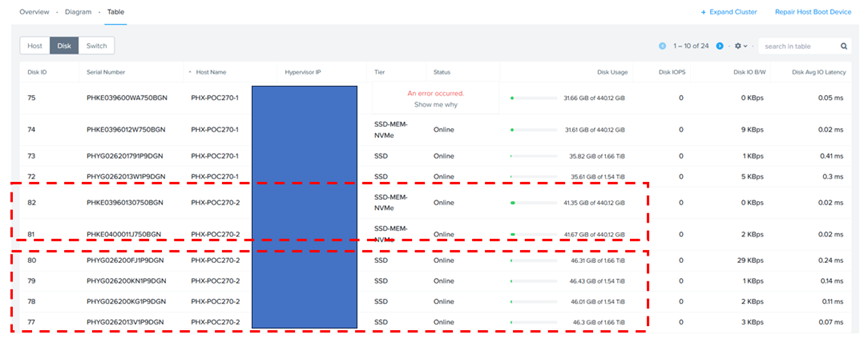
Each AHV node has 2 x 450GB NVMe performance drives and 4 x 1.8 TB SSD for capacity.
Nutanix Cluster is shown as below.

The Nutanix Cluster with 4 servers is shown as below.

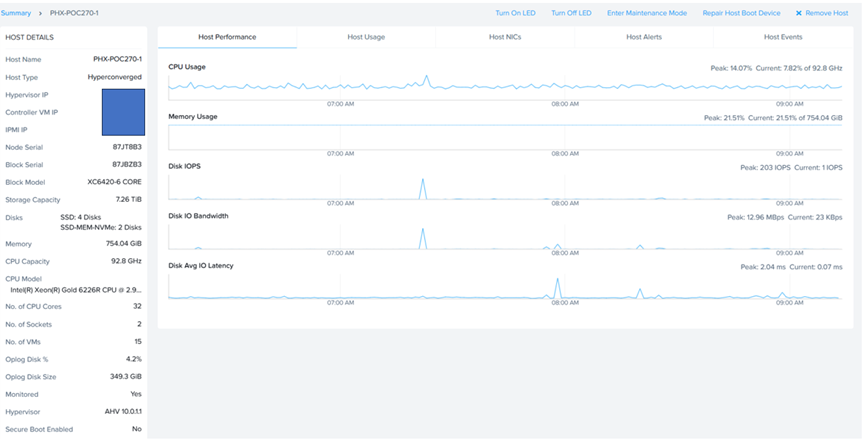
Server ‘PHX-POC270-2’ socket, cores & memory specifications are shown as below.
Server ‘PHX-POC270-2’ storage specifications are shown as below. Remember, each server has 4 x 1.8 TB SSD and 2 x 450GB SSD.
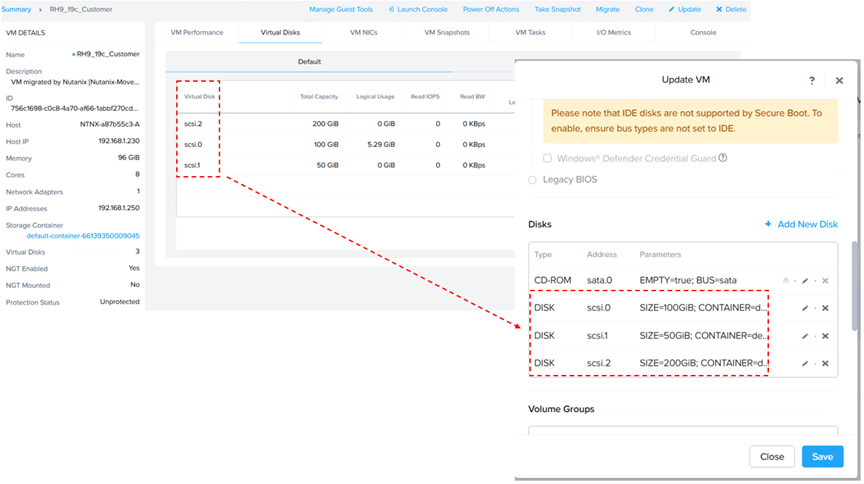
A VM ‘RH9_19c_Customer’ was created with 8 vCPU’s, 96 GB memory, with 1 virtual disk of 100GB, for OS & Oracle binaries (/u01) [ Grid & RDBMS] on Nutanix HCI with Oracle SGA & PGA set to 48GB and 10G respectively.
19c Oracle database with multi-tenant option is planned to be provisioned with Oracle Grid Infrastructure (ASM) and Database version 19c on O/S RHEL 9.0. Oracle ASM was the storage platform with ASMLIB for device persistence.
Details of VM ‘RH9_19c_Customer’ are as show below.

Running the Linux ‘fdisk -lu’ command shows 1 disk of 100GB size for device ‘/dev/sda’ for OS and Oracle binaries (/u01) [ Grid & RDBMS].
root@rh9-19c-customer ~]# fdisk -lu
Disk /dev/sda: 100 GiB, 107374182400 bytes, 209715200 sectors
Disk model: VDISK
Units: sectors of 1 * 512 = 512 bytes
Sector size (logical/physical): 512 bytes / 4096 bytes
I/O size (minimum/optimal): 4096 bytes / 1048576 bytes
Disklabel type: gpt
Disk identifier: 4A993578-EF16-4377-A1C7-BA438A3D86FF
Device Start End Sectors Size Type
/dev/sda1 2048 1230847 1228800 600M EFI System
/dev/sda2 1230848 3327999 2097152 1G Linux filesystem
/dev/sda3 3328000 209713151 206385152 98.4G Linux LVM
Disk /dev/mapper/rhel-root: 63.44 GiB, 68115496960 bytes, 133038080 sectors
Units: sectors of 1 * 512 = 512 bytes
Sector size (logical/physical): 512 bytes / 4096 bytes
I/O size (minimum/optimal): 4096 bytes / 1048576 bytes
Disk /dev/mapper/rhel-swap: 4 GiB, 4294967296 bytes, 8388608 sectors
Units: sectors of 1 * 512 = 512 bytes
Sector size (logical/physical): 512 bytes / 4096 bytes
I/O size (minimum/optimal): 4096 bytes / 1048576 bytes
Disk /dev/mapper/rhel-home: 30.97 GiB, 33256636416 bytes, 64954368 sectors
Units: sectors of 1 * 512 = 512 bytes
Sector size (logical/physical): 512 bytes / 4096 bytes
I/O size (minimum/optimal): 4096 bytes / 1048576 bytes
[root@rh9-19c-customer ~]#
GOS disk scsi_id and Nutanix vDisk vmdisk_uuid
With VMware vSphere, by setting disk.EnableUUID=”TRUE” in the. vmx file, one could find the scsi_id of the vmdk on the GOS (/dev/sdX) to use with udev device persistence.
This parameter is specific to VMware vSphere environments and is used to ensure that the VMDK (Virtual Machine Disk) consistently presents a unique UUID to the guest operating system within a VMware VM.
Nutanix AHV handles disk management and UUID presentation in its own way, and no explicit configuration like disk.EnableUUID = “TRUE” is required from the user.
Do I really need to match up scsi_id of GOS disks with the vDisk vmdisk_uuid of the VM?
Yes, In VMware, from a VM layout perspective, especially for business-critical Oracle workloads, the recommendation is to have multiple PVSCSI controllers & multiple vmdk’s per PVSCI controller for queue depth, latency & throughput purposes.
I had even blogged about adopting multiple PVSCSI controllers for business critical Oracle workloads in my 2020 blog – PVSCSI Controllers and Queue Depth – Accelerating performance for Oracle Workloads
What if we have a DATA vmdk on SCSI1:0 and an FRA vmdk on SCSI2:0, both 100GB? How do we find out on GOS, if /dev/sdX is really a DATA disk or FRA disk?

From an Oracle workload perspective, this is critical as DATA, FRA, REDO disks etc. have different read/write characteristics and patterns and the guidance is not to mix & match vmdk’s of different characteristics as the workload performance may skew.
You will typically not see deployments where one would deploy the DATA, FRA, REDO vmdk on the controller and expect the workload to perform the same otherwise.!!!
One may also argue and state that running ‘lsscsi’ command will show which GOS disks matches up to which SCSI controller and disk position, I have seen it report erroneous results on multiple occasions. Manual match up of GOS and VM vmdk’s scsi_id’s sure shot works.
On the other hand, Nutanix AHV automatically optimizes I/O across a single virtual SCSI adapter through its ‘AHV Turbo Mode’ or ‘Frodo I/O Path’, which simplifies management without sacrificing performance, so manual separation is not required.
AHV handles the I/O multi-queuing automatically, distributing the requests across the cluster’s storage without manual configuration.
This approach simplifies management by eliminating the need for users to manually configure multiple controllers and disks. Impressive!!!!
More on Frodo I/O Path (aka AHV Turbo Mode) can be found at How Nutanix AHV Works
Now back to the question on the table – do we then really need to match up SCSI_ID across GOS and Actual vDisks added on Nutanix?
No, Not really, given that Nutanix has simplified this manual assignment of vmdk’s across SCSI controllers…for the curious minds, sure, why not!!!
Run the ‘scsi_id’ command to get the scsi_id of the GOS disks on VM ‘RH9_19c_Customer’
OS Disk
[root@rac01 ~]# /usr/lib/udev/scsi_id -g -u -d /dev/sda
1NUTANIX_NFS_2_0_416_d5c86f14_936a_4b83_8d45_c3ad4a35c1d2
[root@rac01 ~]#
VG – 10G vDisk
[root@rac01 ~]# /usr/lib/udev/scsi_id -g -u -d /dev/sdb
1NUTANIX_NFS_3_0_443_9f3f847c_983a_4d68_8ec2_cf9a4298a42a
[root@rac01 ~]#
VG – 10G vDisk
[root@rac01 ~]# /usr/lib/udev/scsi_id -g -u -d /dev/sdc
1NUTANIX_NFS_3_0_442_57d797ae_4bb7_48c1_9c59_4be0316f93be
[root@rac01 ~]#
Run the ‘scsi_id’ command to get the scsi_id of the GOS disks on VM ‘rac02’ – you will get the same scsi_id for /dev/sdb and /dev/sdc as they are part of the same VG shared between VM’s ‘rac01’ and ‘rac02’.
OS Disk
[root@rac02 ~]# /usr/lib/udev/scsi_id -g -u -d /dev/sda
1NUTANIX_NFS_2_0_432_02b7019c_727e_4358_b4c8_025dd10285bf
[root@rac02 ~]#
VG – 10G vDisk
[root@rac02 ~]# /usr/lib/udev/scsi_id -g -u -d /dev/sdb
1NUTANIX_NFS_3_0_443_9f3f847c_983a_4d68_8ec2_cf9a4298a42a
[root@rac02 ~]#
VG – 10G vDisk
[root@rac02 ~]# /usr/lib/udev/scsi_id -g -u -d /dev/sdc
1NUTANIX_NFS_3_0_442_57d797ae_4bb7_48c1_9c59_4be0316f93be
[root@rac02 ~]#
Run the acli command to get the uuid of the VG ‘rac_vg’
nutanix@NTNX-5255a127-A-CVM:192.168.1.233:~$ acli vg.list
Volume Group name Volume Group UUID
rac_VG 212369ab-81c2-410b-9d96-8924ad0a5374
nutanix@NTNX-5255a127-A-CVM:192.168.1.233:~$
Run the acli command to get the VM ‘rac01’ details including the vmdisk paths
nutanix@NTNX-5255a127-A-CVM:192.168.1.233:~$ acli vm.get rac01 include_vmdisk_paths=1
rac01 {
can_clear_removed_from_host_uuid: True
config {
agent_vm: False
allow_live_migrate: True
annotation: ” VM migrated by Nutanix [Nutanix-Move] version [6.0.0] (migration plan [Test]) on [Wed Oct 8 23:31:11 UTC 2025].”
apc_config {
apc_enabled: False
}
bios_uuid: “76655401-0d45-4078-a3ef-1ae0c630f6b8”
boot {
boot_device_order: “kCdrom”
boot_device_order: “kDisk”
boot_device_order: “kNetwork”
firmware_config {
nvram_disk_spec {
clone {
container_id: 1137
snapshot_group_uuid: “023ef828-3695-4d53-902c-d07c54a0c6b2”
vmdisk_uuid: “f2c14d7a-215a-4908-8321-ebb3247b7711”
}
}
nvram_disk_uuid: “12f09789-53ad-4e3e-bd9c-6c3756986b06”
nvram_storage_vdisk_uuid: “9ee3bb4f-f05e-4b20-b594-853907aae212”
}
hardware_virtualization: False
secure_boot: True
uefi_boot: True
}
cpu_hotplug_enabled: True
cpu_passthrough: False
disable_branding: False
disk_list {
addr {
bus: “scsi”
index: 0
}
cdrom: False
container_id: 8
container_uuid: “c226521d-3101-4d79-8c7b-387a39489e6d”
device_uuid: “f03e24e3-07a7-42df-adb9-570cf8d8bc25”
naa_id: “naa.6506b8d0a55ea1f941dc3d8276f5e796”
source_vmdisk_uuid: “4ba84cd4-9295-4e1f-9320-cc308e7d4d59”
storage_vdisk_uuid: “97b410da-68ed-4132-bd4a-06003cb9a983”
vmdisk_nfs_path: “/default-container-66139350009045/.acropolis/vmdisk/d5c86f14-936a-4b83-8d45-c3ad4a35c1d2”
vmdisk_size: 107374182400
vmdisk_uuid: “d5c86f14-936a-4b83-8d45-c3ad4a35c1d2” <– This matches up to the scsi_id of /dev/sda [1NUTANIX_NFS_2_0_416_d5c86f14_936a_4b83_8d45_c3ad4a35c1d2 ]
}
disk_list {
addr {
bus: “sata”
index: 0
}
cdrom: True
device_uuid: “94f6006f-be19-4891-a145-6d3e96c60f68”
empty: True
iso_type: “kGuestTools”
}
disk_list {
addr {
bus: “scsi”
index: 1
}
device_uuid: “a8053959-3d6f-4eef-9c35-53b4f4ed7ce3”
volume_group_uuid: “212369ab-81c2-410b-9d96-8924ad0a5374” <– This is the VG uuid
}
generation_uuid: “cdcd9c2d-451f-4eb9-939e-332a77a178ca”
gpu_console: False
hwclock_timezone: “UTC”
machine_type: “q35”
memory_mb: 98304
memory_overcommit: False
name: “rac01”
ngt_enable_script_exec: False
ngt_fail_on_script_failure: False
nic_list {
connected: True
mac_addr: “50:6b:8d:80:15:c9”
network_name: “VM-Default”
network_type: “kNativeNetwork”
network_uuid: “e9aa3612-6089-47ce-b358-56fb8e29c413”
queues: 1
rx_queue_size: 256
type: “kNormalNic”
uuid: “b66594df-0e06-4558-87a4-00544543a503”
vlan_mode: “kAccess”
}
num_cores_per_vcpu: 8
num_threads_per_core: 1
num_vcpus: 1
num_vnuma_nodes: 0
power_state_mechanism: “kHard”
scsi_controller_enabled: True
source_vm_uuid: “756c1698-c0c8-4a70-af66-1abbf270cd37”
vcpu_hard_pin: False
vga_console: True
vm_type: “kGuestVM”
vtpm_config {
is_enabled: False
}
}
cpu_model {
name: “Intel Cascadelake”
uuid: “3de0461e-6313-5e1e-b576-976f5a5308d4”
vendor: “Intel”
}
cpu_model_minor_version_uuid: “43699a37-dfeb-5ae6-a5f9-a1b0528e250d”
host_name: “192.168.1.234”
host_uuid: “3de5fbdd-e624-42ed-80b7-3d53b0b059e0”
is_ngt_ipless_reserved_sp_ready: True
is_rf1_vm: False
logical_timestamp: 5
protected_memory_mb: 98304
secure_boot_var_file_loaded: True
state: “kOn”
uuid: “76655401-0d45-4078-a3ef-1ae0c630f6b8”
}
nutanix@NTNX-5255a127-A-CVM:192.168.1.233:~$
Run the acli command to get the VM ‘rac01’ details including the vmdisk paths
nutanix@NTNX-5255a127-A-CVM:192.168.1.233:~$ acli vm.get rac02 include_vmdisk_paths=1
rac02 {
can_clear_removed_from_host_uuid: True
config {
agent_vm: False
allow_live_migrate: True
annotation: ” VM migrated by Nutanix [Nutanix-Move] version [6.0.0] (migration plan [Test]) on [Wed Oct 8 23:31:11 UTC 2025].”
apc_config {
apc_enabled: False
}
bios_uuid: “345f0403-d90f-4659-b47c-7cf23125dce3”
boot {
boot_device_order: “kCdrom”
boot_device_order: “kDisk”
boot_device_order: “kNetwork”
firmware_config {
nvram_disk_spec {
clone {
container_id: 1137
snapshot_group_uuid: “39f0d1f4-a394-4bd0-8e5b-d1f346ee9c5f”
vmdisk_uuid: “f2c14d7a-215a-4908-8321-ebb3247b7711”
}
}
nvram_disk_uuid: “73e36c9f-e149-4104-b7b7-0aa140f4cf3a”
nvram_storage_vdisk_uuid: “8962aeff-df3e-4b84-ab04-31d93176df19”
}
hardware_virtualization: False
secure_boot: True
uefi_boot: True
}
cpu_hotplug_enabled: True
cpu_passthrough: False
disable_branding: False
disk_list {
addr {
bus: “scsi”
index: 0
}
cdrom: False
container_id: 8
container_uuid: “c226521d-3101-4d79-8c7b-387a39489e6d”
device_uuid: “02abfbab-15dd-49ab-b06d-90bde756b914”
naa_id: “naa.6506b8d91d082a23b0f22badb9edb265”
source_vmdisk_uuid: “4ba84cd4-9295-4e1f-9320-cc308e7d4d59”
storage_vdisk_uuid: “fc2e61ed-78b5-4723-9fe3-9cc13893b72f”
vmdisk_nfs_path: “/default-container-66139350009045/.acropolis/vmdisk/02b7019c-727e-4358-b4c8-025dd10285bf”
vmdisk_size: 107374182400
vmdisk_uuid: “02b7019c-727e-4358-b4c8-025dd10285bf” <– This matches up to the scsi_id of /dev/sda [
1NUTANIX_NFS_2_0_432_02b7019c_727e_4358_b4c8_025dd10285bf]
}
disk_list {
addr {
bus: “sata”
index: 0
}
cdrom: True
device_uuid: “643c3b27-0475-4acb-b74d-d8f978e1df20”
empty: True
iso_type: “kGuestTools”
}
disk_list {
addr {
bus: “scsi”
index: 1
}
device_uuid: “2dcbd7ea-12de-4522-bb45-f945f0aa3299”
volume_group_uuid: “212369ab-81c2-410b-9d96-8924ad0a5374” <– This is the VG uuid
}
generation_uuid: “f60408e8-4b10-4de7-af8f-0307bbb4f955”
gpu_console: False
hwclock_timezone: “UTC”
machine_type: “q35”
memory_mb: 98304
memory_overcommit: False
name: “rac02”
ngt_enable_script_exec: False
ngt_fail_on_script_failure: False
nic_list {
connected: True
mac_addr: “50:6b:8d:9a:95:d9”
network_name: “VM-Default”
network_type: “kNativeNetwork”
network_uuid: “e9aa3612-6089-47ce-b358-56fb8e29c413”
queues: 1
rx_queue_size: 256
type: “kNormalNic”
uuid: “9f78dbdb-b31c-47a9-9f0b-fb1cba40b2b8”
vlan_mode: “kAccess”
}
num_cores_per_vcpu: 8
num_threads_per_core: 1
num_vcpus: 1
num_vnuma_nodes: 0
power_state_mechanism: “kHard”
scsi_controller_enabled: True
source_vm_uuid: “756c1698-c0c8-4a70-af66-1abbf270cd37”
vcpu_hard_pin: False
vga_console: True
vm_type: “kGuestVM”
vtpm_config {
is_enabled: False
}
}
cpu_model {
name: “Intel Cascadelake”
uuid: “3de0461e-6313-5e1e-b576-976f5a5308d4”
vendor: “Intel”
}
cpu_model_minor_version_uuid: “43699a37-dfeb-5ae6-a5f9-a1b0528e250d”
host_name: “192.168.1.232”
host_uuid: “bde492ce-17cb-47fa-88aa-f839c35a1605”
is_ngt_ipless_reserved_sp_ready: True
is_rf1_vm: False
logical_timestamp: 5
protected_memory_mb: 98304
secure_boot_var_file_loaded: True
state: “kOn”
uuid: “345f0403-d90f-4659-b47c-7cf23125dce3”
}
nutanix@NTNX-5255a127-A-CVM:192.168.1.233:~$
GOS scsi_id ‘s of /dev/sdb & /dev/sdc
[root@rac02 ~]# /usr/lib/udev/scsi_id -g -u -d /dev/sdb
1NUTANIX_NFS_3_0_443_9f3f847c_983a_4d68_8ec2_cf9a4298a42a
[root@rac02 ~]#
[root@rac02 ~]# /usr/lib/udev/scsi_id -g -u -d /dev/sdc
1NUTANIX_NFS_3_0_442_57d797ae_4bb7_48c1_9c59_4be0316f93be
[root@rac02 ~]#
Run the ‘vdisk_config_printer´ command to match up GOS scsi_id & individual vDIsk scsi_id in VG.
The vdisk_config_printer command will display a list of vdisk information for all vdisk on the cluster.
The key-value pairs to look out for are vdisk_name and nfs_file_name , what I found out was the GOS scsi_id may be constructed per this formula, based on the output –
GOS scsi_id = ‘1NUTANIX’ + REPLACE (vdisk_name, ‘:’ , ‘_’) + REPLACE (nfs_file_name, ‘-‘, ‘_’)
nutanix@NTNX-5255a127-A-CVM:192.168.1.233:~$ vdisk_config_printer | grep -C 13 uuid | grep “212369ab-81c2-410b-9d96-8924ad0a5374
…..
vdisk_id: 188211
vdisk_name: “NFS:3:0:442”
vdisk_size: 10737418240
iscsi_target_name: “iqn.2010-06.com.nutanix:racvg-212369ab-81c2-410b-9d96-8924ad0a5374” <– Volume Group
iscsi_lun: 1
container_id: 1137
params {
replica_placement_policy_id: 2
}
creation_time_usecs: 1760125932063711
—
vdisk_creator_loc: 74002148
nfs_file_name: “57d797ae-4bb7-48c1-9c59-4be0316f93be” <–matches with /dev/sdc scsi_id [1NUTANIX_NFS_3_0_442_57d797ae_4bb7_48c1_9c59_4be0316f93be]
iscsi_multipath_protocol: kMpio
scsi_name_identifier: “naa.6506b8d471f162f03c77a3644da8a230”
never_hosted: false
snapshot_chain_id: 187961
data_log_id: 188223
flush_log_id: 188224
vdisk_creation_time_usecs: 1760125932063711
oplog_type: kDistributedOplog
last_updated_pithos_version: kDistributedPaxosKeys
always_write_emap_extents: true
is_metadata_vdisk: false
vdisk_uuid: “dd57ce56-af60-4269-82bd-803c08303263”
chain_id: “5b8bb734-481c-4952-a705-993dcbd3c560”
last_modification_time_usecs: 1760126111261364
vdisk_id: 188212
vdisk_name: “NFS:3:0:443”
vdisk_size: 10737418240
iscsi_target_name: “iqn.2010-06.com.nutanix:racvg-212369ab-81c2-410b-9d96-8924ad0a5374” <– VG
iscsi_lun: 0
container_id: 1137
params {
replica_placement_policy_id: 2
}
creation_time_usecs: 1760125932066508
—
vdisk_creator_loc: 74002149
nfs_file_name: “9f3f847c-983a-4d68-8ec2-cf9a4298a42a” <–matches with /dev/sdb scsi_id [1NUTANIX_NFS_3_0_443_9f3f847c_983a_4d68_8ec2_cf9a4298a42a]
iscsi_multipath_protocol: kMpio
scsi_name_identifier: “naa.6506b8d471f162f0703f07d54ea84336”
never_hosted: false
snapshot_chain_id: 187962
data_log_id: 188221
flush_log_id: 188222
vdisk_creation_time_usecs: 1760125932066508
oplog_type: kDistributedOplog
last_updated_pithos_version: kDistributedPaxosKeys
always_write_emap_extents: true
is_metadata_vdisk: false
vdisk_uuid: “5d9b61d8-a8ac-4191-aa4f-f682209d9346”
chain_id: “f4e19851-92dc-4f36-a904-75f664e6a03e”
last_modification_time_usecs: 1760126111257443
…
nutanix@NTNX-5255a127-A-CVM:192.168.1.233:~$
More details on the ‘vdisk_config_printer’ command can be found at AOS Administration.
Summary
We can definitely see a lot of advantages for business-critical Oracle workloads on Nutanix
- Nutanix Volume Group (VG) let you configure a cluster with shared-disk access across multiple VMs. One can use VG as default VG or VGLB which can load balance & distribute ownership of the vDisks across all the CVMs in the cluster, thus providing better performance.
- Nutanix AHV automatically optimizes I/O across a single virtual SCSI adapter through its ‘AHV Turbo Mode’ or ‘Frodo I/O Path’, which simplifies management without sacrificing performance, so manual separation of vDisks across multiple SCSI controllers is is not required.
Best Practices for running Oracle workloads on Nutanix can be found at Oracle on Nutanix Best Practices
Conclusion
Business Critical Oracle Workloads have stringent IO requirements and enabling, sustaining, and ensuring the highest possible performance along with continued application availability is a major goal for all mission critical Oracle applications to meet the demanding business SLAs.
This blog is an attempt to investigate the relationship between Nutanix vDisks, Volume Groups (VG) & SCSI Controllers and how is fundamentally different when compared to VMware vmdk’s & PVSCSI Controllers.
Disclaimer – This is not an official Nutanix blog – just my private investigation in my lab environment, to get a better understanding how Nutanix platform works under the covers, having worked in the VMware space for 12+ years as the Global Oracle Practice Lead and in the Nutanix space as an Sr OEM System Engineer for the past couple months.

 Oracle Workloads - Where Eagles Dare !!!
You must be logged in to post a comment.