Business Critical Oracle Workloads have stringent IO requirements and enabling, sustaining, and ensuring the highest possible performance along with continued application availability is a major goal for all mission critical Oracle applications to meet the demanding business SLAs.
This blog is an attempt to investigate Nutanix Volume Groups (VG), understand how it is fundamentally different & inherently simple when compared to VMware virtual disk (vmdk) sharing with multi-writer attribute between VM’s for Guest Clustering Applications e.g. Oracle Real Applications Clusters etc. and how Nutanix Volume Groups (VG) overcomes all the challenges that currently plagues VMware virtual disk sharing with multi-writer attribute that has been well documented in KB 1034165 for VMFS and KB 2121191 for vSAN.

Disclaimer – This is not an official Nutanix blog – just my private investigation in my lab environment, to get a better understanding how Nutanix platform works under the covers, having worked in the VMware space for 12+ years as the Global Oracle Practice Lead and in the Nutanix space as an Sr OEM System Engineer for the past couple months.
Oracle Real Application Clusters (RAC)
Oracle Clusterware is portable cluster software that provides comprehensive multi-tiered high availability and resource management for consolidated environments. It supports clustering of independent servers so that they cooperate as a single system.
Oracle Clusterware is the integrated foundation for Oracle Real Application Clusters (RAC), and the high-availability and resource-management framework for all applications on any major platform.
There are two key requirements for Oracle RAC:
• Shared storage
• Multicast Layer 2 networking
A typical RAC Cluster has 2 types of disks –
- Non-shared disks – These disks are exclusive to the RAC VM itself – root disk (/), Oracle RDBMS & Grid binaries (/u01)
- Shared disks – These disks are shared among all the RAC VM’s – DATA, REDO, FRA, CRS, VOTE etc.
Snapshot & Cloning RAC VM’s – Concepts
For example. Assume a 2 Node Oracle RAC with VM’s ‘rac01’ and ‘rac02’, A Snapshot of a 2 node Oracle RAC cluster should produce 3 artefacts –
- Snapshot of RAC VM ‘rac01’ non-shared disk (s) as a consistent unit
- Snapshot of RAC VM ‘rac02’ non-shared disk (s) as a consistent unit
- Snapshot of ALL shared disks as a consistent unit
This way we can glue all 3 components back together to get a clone of the original RAC Cluster.
For a n-node Oracle RAC, we should have n+1 snapshots, ‘n’ snapshots of ‘n’ nodes plus 1 snapshot of the ALL-shared disk (s) as a consistent unit
Cloning a n-node Oracle RAC cluster should result in ‘n’ VM clones plus 1 clone of the shared disk (s) as a consistent unit
Unsupported Actions or Features with VMware multi-writer attribute for shared vmdk’s
VMware multi-writer option allows VMFS-backed disks to be shared and written to by multiple VMs. By default, the simultaneous multi-writer “protection” is enabled for all vmdk files i.e. all VM’s have exclusive access to their vmdk files. So, in order for all of the VM’s to access the shared vmdk’s simultaneously, the multi-writer protection needs to be disabled.
KB 1034165 for VMFS and KB 2121191 for vSAN provides more details on multi-writer option to allow VM’s to share vmdk’s.
The notable Unsupported actions / features when deploying shared vmdk’s with multi-writer flag include
- Snapshots of VMs with independent-persistent disks not supported
- Cloning of VMs not supported
- Storage vMotion not supported.
- Changed Block Tracking (CBT) not supported

The above gaps have not been addressed starting VMware vSphere 5.5 all the way till VMware vSphere 8.x as per the article.
I have released multiple blogs on Oracle RAC on VMware highlighting the VMware multi-writer flag attribute and the workarounds that Customers have to use to get by this issue – https://vracdba.com/?s=oracle+rac.
More details on VMware multi-writer attribute & unsupported Actions or Features can be found in KB 1034165 for VMFS and KB 2121191 for vSAN.
Multi-writer Issues – What this means to Business-Critical Oracle RAC workloads
Organizations deploy Oracle RAC technology to ensure they are able to provide High Availability, Rolling Patch upgrade, TAF/FAN/ONS, all of the wonderful feature’s that Oracle RAC provides to their business-critical workloads, even if RAC technology licensing is super expensive.
The underlying core assumption being, any underlying infrastructure should be able to provide basic Day 2 operation capability seamlessly, right out of the gate, without any workaround i.e. Ability to take Snapshots, Cloning, Change Block Tracking for DR purposes, Storage migration etc.
Inability to provide the basic, much-needed Day 2 operations for their business-critical RAC workloads on VMware vSphere using multi-writer attribute (both VMFS & vSAN), right out of the gate, without any workaround, severely affects business SLA’s, RTO’s & RPO’s, which leaves them no choice but to adjust their business SLA’s, RTO’s & RPO’s, not a good business practice.

We have the Solution – Nutanix Volume Groups (VG) to the rescue
A Nutanix Volume Group (VG) is a collection of logically related vDisks called volumes. You can attach Nutanix VGs to the VMs.
With VGs, you can separate the data vDisks from the VM’s boot vDisk, which allows you to create a protection domain or protection policy that consists only of the data vDisks for snapshots and cloning.
In addition, VGs let you configure a cluster with shared-disk access across multiple VMs.
Supported clustering applications include Oracle Real Application Cluster (RAC), IBM Spectrum Scale (formerly known as GPFS), Veritas InfoScale, and Red Hat Clustering.
You can use Nutanix VGs in two ways:
- Default VG
- This type of VG provides the best data locality because it doesn’t load-balance vDisks in a Nutanix cluster, which means that all vDisks in default VGs have a single CVM providing their I/O. For example, in a four-node Nutanix cluster that includes a VG with eight vDisks attached to a VM, a single CVM owns all the vDisks, and all I/O to the eight vDisks goes through this CVM.
- VG with load balancing (VGLB)
- You can create a VG load balancer in AHV. If you use ESXi, you can use Nutanix Volumes with iSCSI to achieve this functionality. VG load balancers distribute ownership of the vDisks across all the CVMs in the cluster, which can provide better performance. Use the VGLB feature if your applications or databases require better performance than the default VG provides. VGLB might cause higher I/O latency in scenarios where the network is already saturated by the workload.
More details on Nutanix Volume Groups (VG) can be found at Nutanix Volume Groups.
Test Case
Below are 3 simple test cases to demonstrate the simplicity & viability of Nutanix Volume Groups for Business-critical Oracle RAC workloads
- Create / Attach Volume Group (VG) to RAC VM’s
- Snapshot of Volume Group (VG)
- Cloning a Volume Group (VG)
Our Mission …

Test Bed
The Lab setup consisted of a Nutanix Cluster AHV 10.0.1.1, 4 Dell XC6420-6 Servers, each server with 2 socket, 32 cores and 768GB RAM.
Each AHV node has 2 x 450GB NVMe performance drives and 4 x 1.8 TB SSD for capacity.
Nutanix Cluster is shown as below.

The Nutanix Cluster with 4 servers is shown as below.

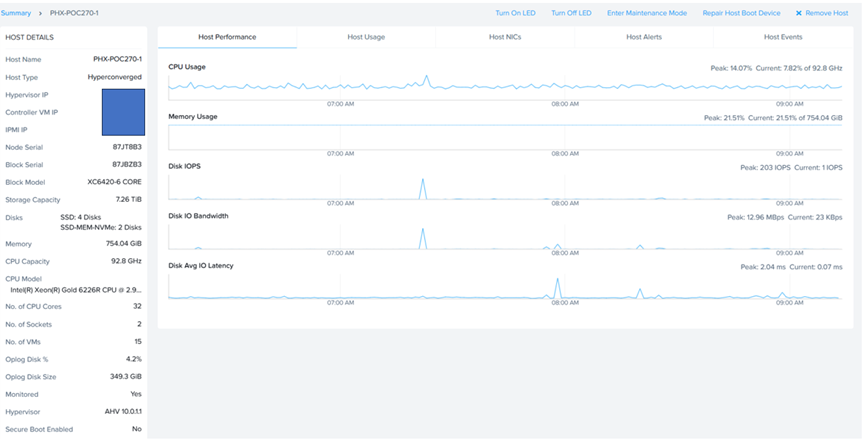
Server ‘PHX-POC270-2’ socket, cores & memory specifications are shown as below.
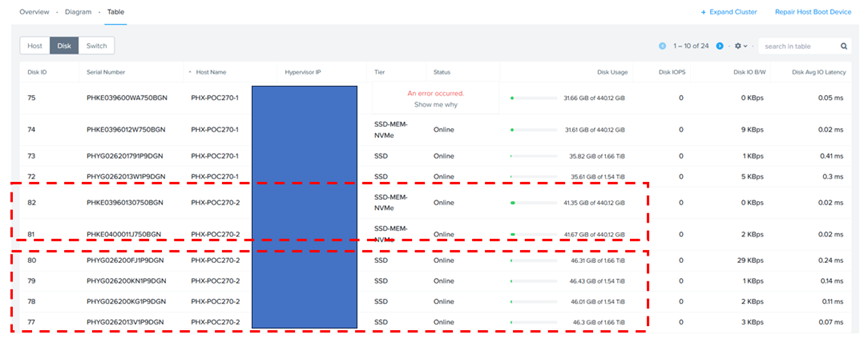
Server ‘PHX-POC270-2’ storage specifications are shown as below. Remember, each server has 4 x 1.8 TB SSD and 2 x 450GB SSD.
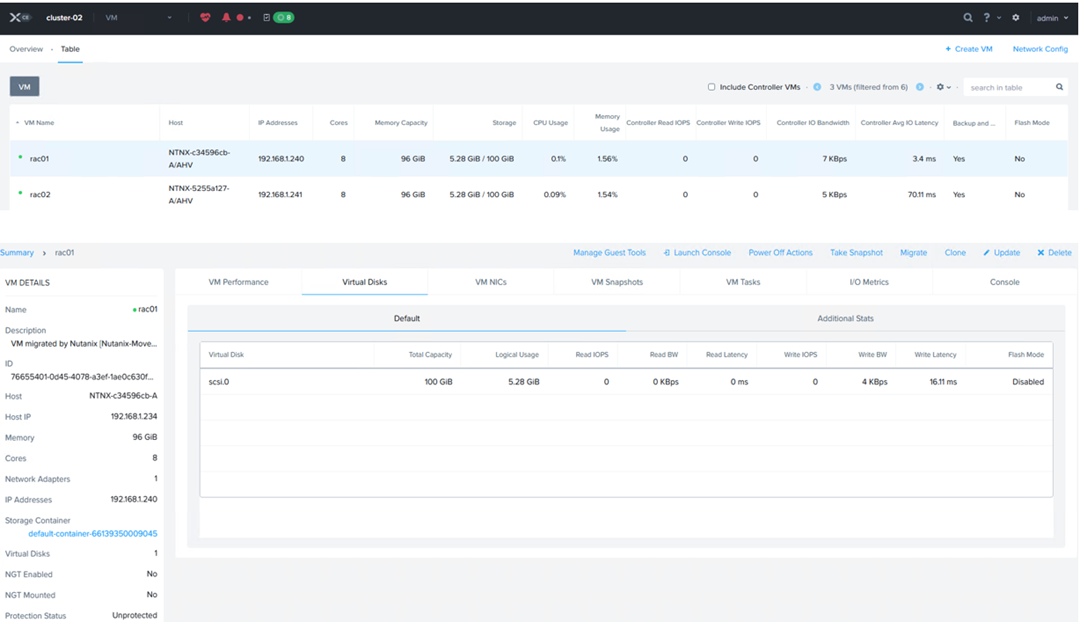
2 VM’s were created – VM ‘rac01’ and VM ‘rac02’, each with 8 vCPU’s, 96 GB memory, with 1 virtual disk each of 100GB, for OS & Oracle binaries (/u01) [ Grid & RDBMS] on Nutanix HCI with Oracle SGA & PGA set to 48GB and 10G respectively.
A RAC cluster with multi-tenant option is planned to be provisioned with Oracle Grid Infrastructure (ASM) and Database version 19c on O/S RHEL 9.0.
Oracle ASM was the storage platform with ASMLIB for device persistence.
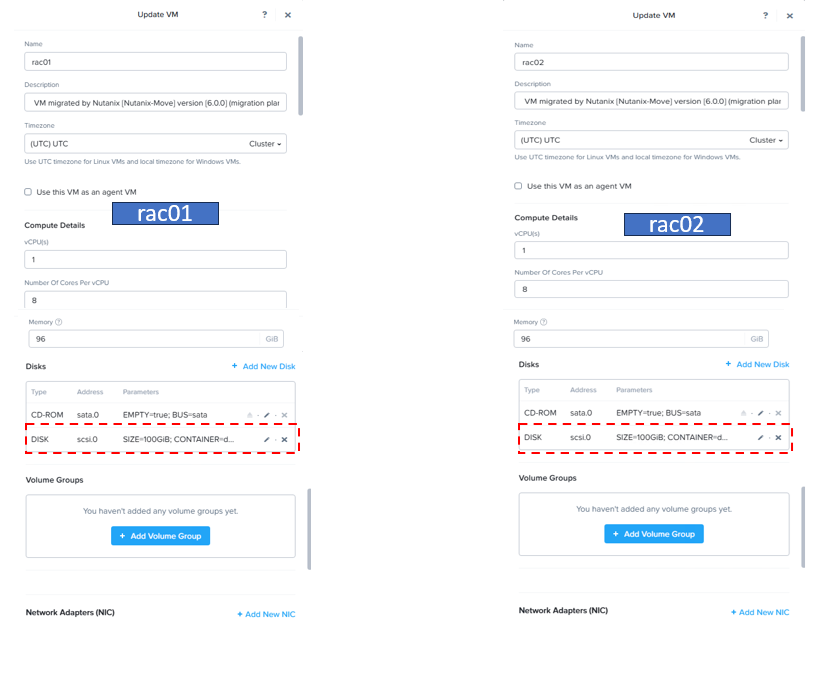
Details of VM ‘rac01’ are as show below.
Details of VM ‘rac02’ are as show below.
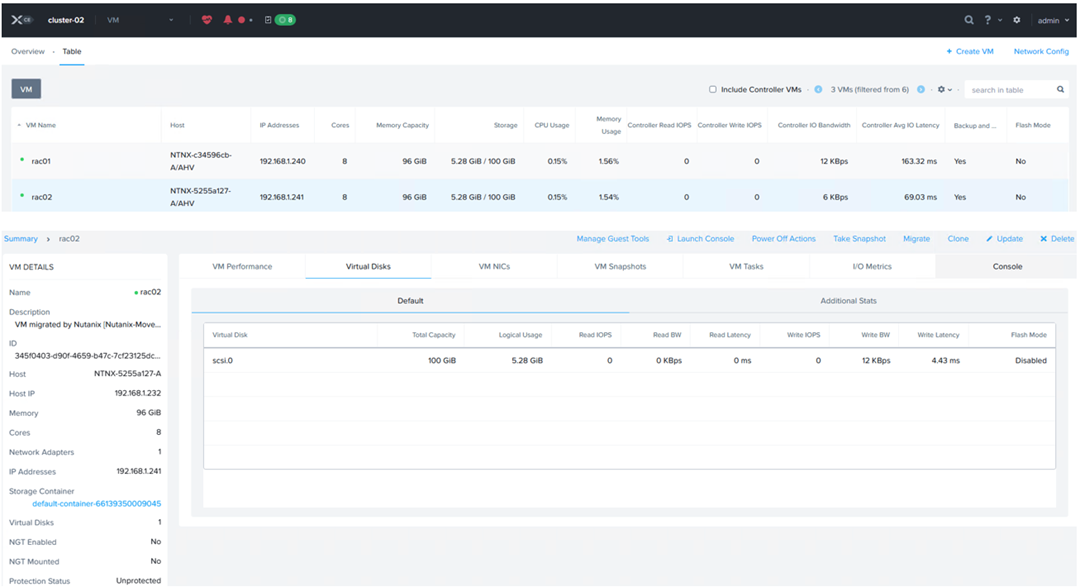
We can see VM ‘rac01’ and VM ‘rac02’, each with 1 virtual disk each of 100GB, on scsi.0, for OS & Oracle binaries (/u01) [ Grid & RDBMS] on Nutanix HCI.
Running the Linux ‘fdisk -lu’ command shows 1 disk of 100GB size for device ‘/dev/sda’ for OS and Oracle binaries (/u01) [ Grid & RDBMS].

Create / Attach Volume Group (VG) to RAC VM’s
The purpose of this section is to go through the steps of sharing VG between RAC VM’s ‘rac01’ and ‘rac02’ for the purpose of creating shared disks for an Oracle RAC cluster.
We can create a new Volume Group (VG) in two ways
- Create a new VG, then attach it to VM’s ‘rac01’ and ‘rac02’
- Create a new VG using the ‘Update’ option of one VM, say ‘rac01’, add vDisks to the VG, then attach VG to VM ‘rac02’ in a separate step
We decided to create a new Volume Group (VG) using the VG option on the GUI, then attach it to VM’s ‘rac01’ and ‘rac02’.
Now we will add 2 vDisks of 10GB each to the VG created, just for illustration purposes, in real production installs, one could have multiple vDisks and multiple VGs for many uses cases.
Using Prism Central (PC) (or Prism Element (PE)) ,we will create a VG ‘rac_vg’, add 2 vDisks of 10G each and chose VG to be Load Balanced.


Chose ‘Update’ VG option, then attach the VG ‘rac_vg’ to VM ‘rac01’ as shown below
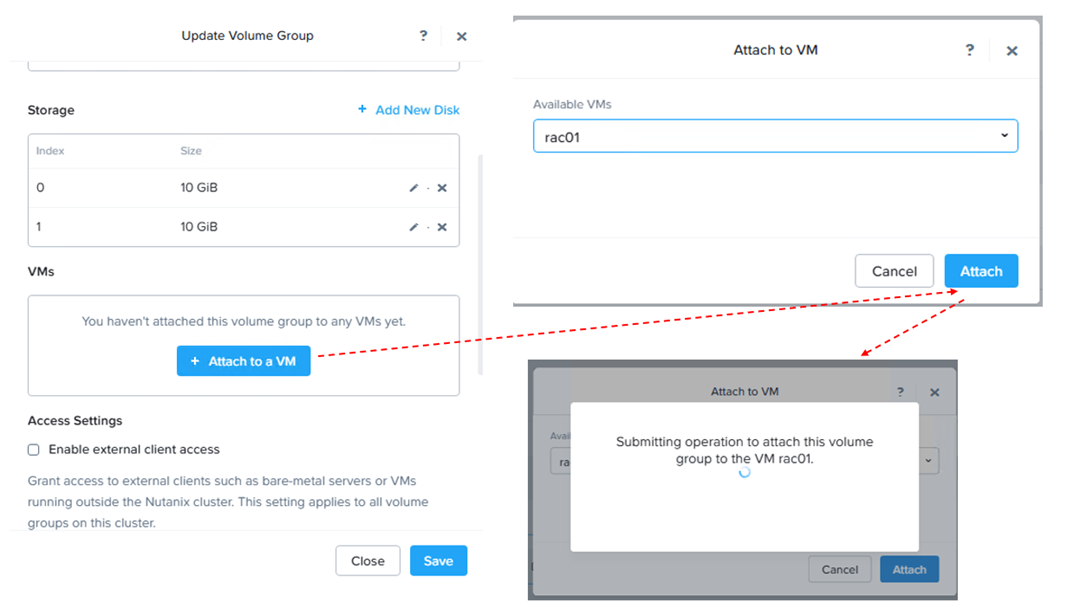
In the same step, attach the VG ‘rac_vg’ to VM ‘rac02’ as shown below

Now the Volume Group ‘rac_vg’ is attached to both RAC VM’s ‘rac01’ and ‘rac02’

We can see here that the Volume Group ‘rac_vg’ is attached to both RAC VM’s ‘rac01’ and ‘rac02’

Voila, now we can see 2 devices, ‘/dev/sdb’ and ‘/dev/sdc’, 10G each, on both VM’s ‘rac0’ and ‘rac02’.

We were able to successfully add shared disks to both RAC VM’s.
The rest of the steps to create a RAC cluster is the same as described in the Oracle documentation.
Snapshot of Volume Group (VG)
A Nutanix VM snapshot doesn’t snapshot an attached volume group because VM snapshots are designed for the VM’s virtual disks, while volume groups are a separate storage construct.
Volume groups are presented to the guest OS as separate virtual disks, but they are not considered part of the VM’s intrinsic storage in the same way as the OS and data disks attached directly to the VM.
To protect volume groups, you must create separate volume group snapshots or use protection domains that include both the VM and the volume group. This allows for independent recovery of the VM’s OS disk from the application data on the volume group.
Use Nutanix Prism to create snapshots specifically for the volume group, which captures only the data within that group.
With Nutanix VG, this is precisely what we are looking for – We get separate snapshots of RAC VM ‘rac01’ , VM ‘rac02’ and a VG snapshot of ALL the shared disk (s) in the VG.
All we need is to attach a Clone from this VG snapshot to another RAC Cluster & Voila, we have a 2nd RAC cluster, assuming that OS & DB / Grid s/w versions are the same – RAC as a Service!!!
With VMware vSphere, you cannot snapshot the shared vmdk’s using multi-writer attribute as per KB 1034165 for VMFS and KB 2121191 for vSAN.
Using Prism Element, Click on VG, then click on ‘Create Recovery Plans’ as shown below
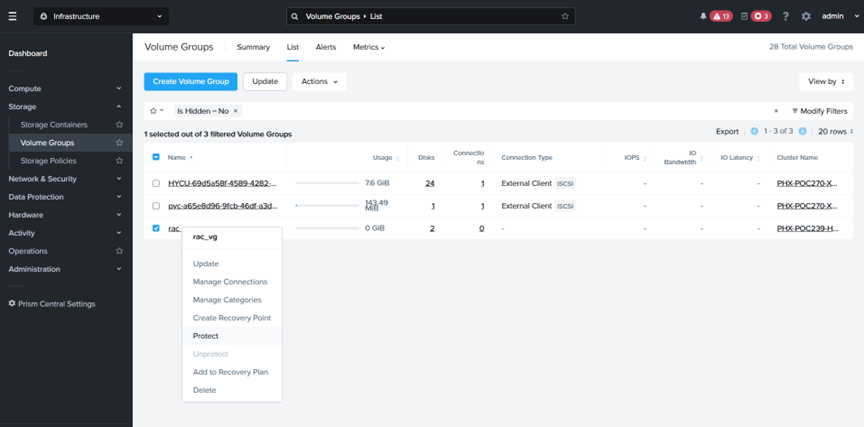
The Snapshot (Recovery Point) of the VG is created as shown below.

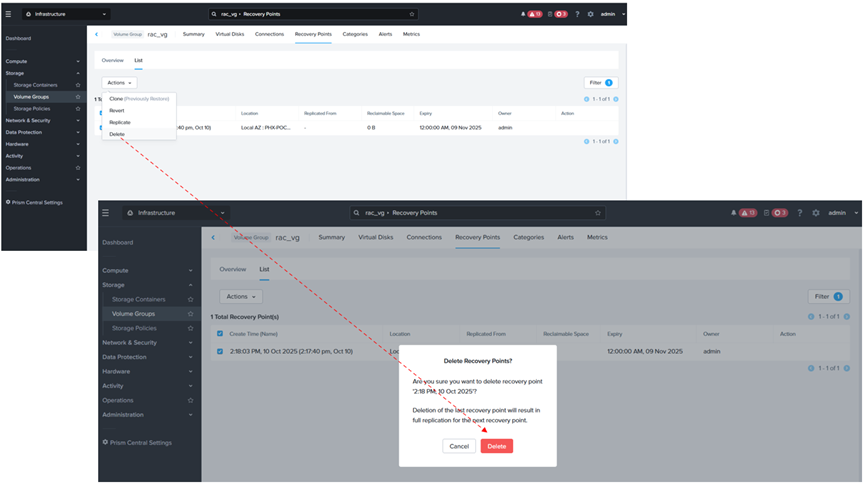
Steps for deleting a VG Snapshot are shown as below
Cloning a Volume Group (VG)
Similarly, we can clone a Volume Group ‘rac_vg’ using Prism Element.
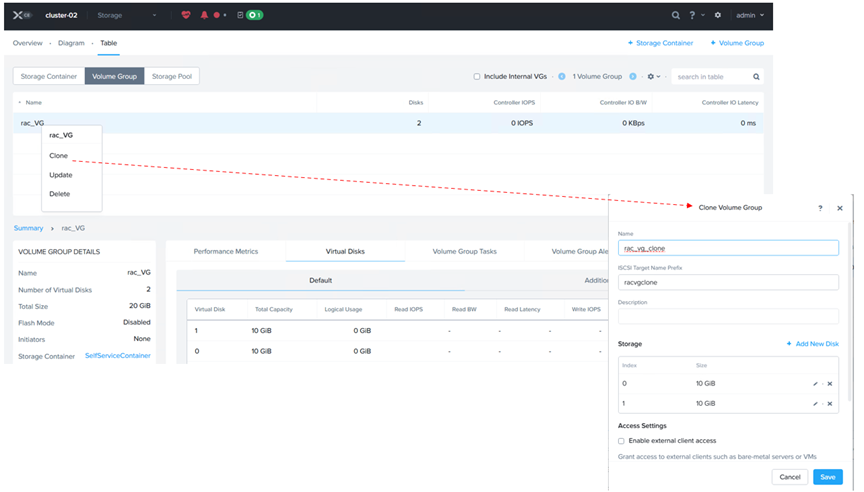
The Clone of the VG ‘rac_vg_clone’ is created as shown below.

More details on VG Cloning can be found at Cloning a Volume Group.
Summary
We can definitely see a lot of advantages using Nutanix Volume Groups (VG) for business-critical Oracle RAC workloads on Nutanix as it seamlessly & without any work-arounds when it comes to Day 2 operations.
We were able to demonstrate the VG capabilities successfully for the 3 test cases below
- Create / Attach a Volume Group (VG) to RAC VM’s
- Snapshot of VM with Volume Group (VG)
- Cloning a VM with Volume Group (VG)
Best Practices for running Oracle workloads on Nutanix can be found at Oracle on Nutanix Best Practices
Conclusion
Business Critical Oracle Workloads have stringent IO requirements and enabling, sustaining, and ensuring the highest possible performance along with continued application availability is a major goal for all mission critical Oracle applications to meet the demanding business SLAs.
This blog is an attempt to investigate Nutanix Volume Groups (VG), understand how it is fundamentally different & inherently simple when compared to VMware virtual disk (vmdk) sharing with multi-writer attribute between VM’s for Guest Clustering Applications e.g. Oracle Real Applications Clusters etc. and how Nutanix Volume Groups (VG) overcomes all the challenges that currently plagues VMware virtual disk sharing with multi-writer attribute that has been well documented in KB 1034165 for VMFS and KB 2121191 for vSAN..
Disclaimer – This is not an official Nutanix blog – just my private investigation in my lab environment, to get a better understanding how Nutanix platform works under the covers, having worked in the VMware space for 12+ years as the Global Oracle Practice Lead and in the Nutanix space as an Sr OEM System Engineer for the past couple months.

 Oracle Workloads - Where Eagles Dare !!!
You must be logged in to post a comment.