Oracle Real Application Clusters on VMware Virtual SAN

Oracle Real Application Clusters on VMware Virtual SAN

VMware Virtual SAN

VMware Virtual SAN is VMware’s software-defined storage solution for hyper-converged infrastructure, a software-driven architecture that delivers tightly integrated computing, networking, and shared storage from a single virtualized x86 server. Virtual SAN delivers high performance, highly resilient shared storage by clustering server-attached flash devices and hard disks (HDDs).

Virtual SAN delivers enterprise-class storage services for virtualized production environments along with predictable scalability and all-flash performance—all at a fraction of the price of traditional, purpose-built storage arrays. Just like vSphere, Virtual SAN provides users the flexibility and control to choose from a wide range of hardware options and easily deploy and manage it for a variety of IT workloads and use cases. Virtual SAN can be configured as all-flash or hybrid storage.

With more and more production servers being virtualized, the demand for highly converged server-based storage is surging. VMware Virtual SAN aims at providing a highly scalable, available, reliable, and high performance storage using cost-effective hardware, specifically direct-attached disks in VMware ESXi hosts. Virtual SAN adheres to a new policy-based storage management paradigm, which simplifies and automates complex management workflows that exist in traditional enterprise storage systems with respect to configuration and clustering

Extended Oracle Real Application Clusters

Customers deploying Oracle Real Application Clusters (RAC) have requirements such as stringent SLA’s continued high performance, and application availability. It is a major challenge for business organizations to manage data storage in these environments due to the stringent business requirement. Common issues in using traditional storage solutions for Business Critical Application (BCA) include inadequate performance, scale-in/scale-out, storage inefficiency, complex management, and high deployment and operating costs.

RAC on Extended distance is an architecture that provides extremely fast recovery from a site failure and allows all the nodes at all sites to actively process transactions as part of a single database cluster. The Storage and the Network layer is “stretched” across the sites making them universally accessible from all sites.

It provides greater availability than a local RAC would but under no circumstances should we assume that RAC is a Disaster Recovery solution, it’s a Disaster Avoidance Solution.

Continue reading

Posted in Oracle, VMware Hybrid Cloud | Comments Off on Oracle Real Application Clusters on VMware Virtual SAN

Virtual Volumes for Database Backup and Recovery

Virtual Volumes for Database Backup and Recovery

In the first part of this series we provided a high level view of the benefits of using Virtual Volumes enabled storage for database operations. In this post, we will examine in more detail how Virtual Volumes can improve the backup and recovery capabilities for business critical databases, specifically Oracle.

The backups for Oracle can be Database consistent or Crash consistent. In this part we will look at Database consistent backup and recovery.

The Setup:

The solution requires VVol enabled storage. We leveraged SANBLaze VirtuaLun as the backend storage for the backup and recovery exercise. We used the VirtuaLun 7.3 emulator from SANBlaze. This emulator is VVol enabled and is one of the first VVol certified storage solutions available.

Blog 2 Fig 1Figure 1: SANBlaze Array for VVol Testing

Oracle Database Server:

A Single Instance Oracle 12c Database with Grid Infrastructure with database name VVOL12C was setup in a VMware Virtual Machine named ORACLE-VVOL. The Oracle database was hosted on a 2 vCPU and 8GB RAM VM running Oracle Enterprise Linux 6.6 with space allocated on a SANBlaze LUN

Continue reading

Posted in Oracle, VMware Hybrid Cloud | Comments Off on Virtual Volumes for Database Backup and Recovery

Oracle, VMware and Extended Distance Oracle Real Application Clusters on vSphere Metro Storage Cluster

Oracle, VMware and Extended Distance Oracle Real Application Clusters on vSphere Metro Storage Cluster

Nowadays a high availability cluster (for any kind of application) in a single data center is almost not enough to ensure the kind of availability a Mission Critical Application needs which support revenue generation.

Typical issues plaguing a data center may include local power outage, airplane crash, server room flooding etc.

ERAC1

Do we have a solution?

ERAC2

THE answer: a “Stretched” Cluster, or one that is distributed between multiple sites , as long as the distance between them is within 100kms / satisfy 5ms Round Trip Latency time requirement.

This architecture best fits especially in regards to distance, latency, and degree of protection it provides.

Site separation is great protection for some local disasters as mentioned above but not all. Disasters such as earthquakes, hurricanes, and regional floods may affect a much greater area.

For comprehensive protection against regional disasters including protection against corruptions, Oracle Data Guard and VMware Site Recovery Manager (SRM) can be combined with Extended distance Oracle RAC on vSphere Metro Storage Cluster, giving us both a Disaster Avoidance and a Disaster Recovery Solution.

Continue reading

Posted in Oracle, VMware Hybrid Cloud | Comments Off on Oracle, VMware and Extended Distance Oracle Real Application Clusters on vSphere Metro Storage Cluster

Virtual Volumes: A game changer for operations of virtualized business critical databases

Virtual Volumes: A game changer for operations of virtualized business critical databases

This is first of a series of posts on deploying vSphere Virtual Volumes for Tier 1 Business Critical Databases. Although this article is written with a focus on Oracle databases, much of this discussion holds good for any Mission critical application.

Business critical databases are among the last workloads virtualized in enterprises, primarily because of the challenges that they pose with growth and scale. Typically the low hanging fruits are virtualizing the Development, Testing/QA, Staging databases after running a successful POC and then moving on the big guy’s i.e. the Production databases.

There are many common concerns about virtualizing business critical databases that inhibit and delay virtualization of these workloads:

  • Business critical virtualized databases need to meet strict SLAs for performance and storage has traditionally been the slowest component
  • Databases grow quickly, while at the same time there is a need to reduce backup windows and their impact on system performance
  • There is a regular need to clone and refresh databases from production to QA and other environments. However, the size of the modern databases make it harder to clone and refresh data from production to other environments
  • Databases of different levels of criticality need different storage performance characteristics and capabilities.
  • There is a never-ending debate between DBAs and Systems administrators regarding filesystems VS raw devices and VMFS VS RDM. These are primarily due to some of the deficiencies that existed in the past with virtualization.

Continue reading

Posted in Oracle, VMware Hybrid Cloud | Comments Off on Virtual Volumes: A game changer for operations of virtualized business critical databases

Harnessing the Power of Storage Virtualization and Site Recovery Manager to Provide HA and DR Capabilities to Business Critical Databases – VAPP4634

Harnessing the Power of Storage Virtualization and Site Recovery Manager to Provide HA and DR Capabilitiesto Business Critical Databases

How do you simplify and improve availability of your Extended distance Oracle Real Application Cluster using vSphere Metro Storage Cluster (vMSC) ?

Storage Virtualization, both host based and appliance based, can pave the way for increased ease of configuration and improved availability of your cluster based applications. vMSC featues including vMotion, HA, DRS and FT as well as extended distance Oracle Real Application Clusters (RAC) are greatly simplified, and in some cases, made possible through the use of storage virtualization technologies such as EMC VPLEX, Netapp Metro Cluster, IBM SVC, HP 3PAR Peer Persistence or Oracle Automatic Storage Management (ASM) disk groups.

Site Recovery Manager with Oracle Data Guard can provide the much needed Disaster Recovery component thereby providing a complete HA and DR solution to Business Critical Databases

See where and how virtualized storage provided by VPLEX and ASM are most effectively used to help protect your business critical applications virtualized on vSphere. See how one Global 1000 company used storage virtualization to achieve 0 second RPO and 5 second RTO.

Details on the solution will be discussed in detail at vmworld 2015 in session VAPP4634:

Harnessing the Power of Storage Virtualization and Site Recovery Manager to Provide HA and DR Capabilities to Business Critical Databases (VAPP4634)
Session Date/Time: 09/03/2015 01:30 PM – 02:30 PM

Posted in Oracle, VMware Hybrid Cloud | Comments Off on Harnessing the Power of Storage Virtualization and Site Recovery Manager to Provide HA and DR Capabilities to Business Critical Databases – VAPP4634

STO4452 – Virtual Volumes (VVOLS) a game changer for running Tier 1 Business Critical Databases

Virtual Volumes (VVOLS) a game changer for running Tier 1 Business Critical Databases:

One of the major components released with vSphere 6 this year was the support for Virtual Volumes (VVOLS). VVOLS has been gaining momentum with storage vendors, who are enabling its capabilities in their arrays.

When virtualizing business databases there are many critical concerns that need to be addressed that include:

1. Database Performance to meet strict SLAs
2. Daily Operations e.g. Backup & Recovery to complete in set window
3. Cut down time to Clone / Refresh of Databases from Production
4. Meet different IO characteristics and capabilities based on criticality
5. Never ending debate with DBAs : File Systems v/s Raw Devices , VMFS v/s RDM

VVOLS can offer solutions to mitigate these concerns that impact the decision to virtualize business critical databases. VVOLS can help with the following:

1. Reduce backup windows for databases
2. Provide ability to have Database consistent backups
3. Reduced cloning times for multi-terabyte databases
4. Provide capabilities for Storage Policy based management

Details on the solutions available with VVOLS and its impact on “Virtualized Tier1 Business Critical Databases” will be discussed in detail at vmworld 2015 in session STO4452:

STO4452 – Virtual Volumes (VVOLS) a game changer for running Tier 1 Business Critical Databases
Session Date/Time: 08/31/2015 03:30 PM – 04:30 PM

Posted in Oracle, VMware Hybrid Cloud | Comments Off on STO4452 – Virtual Volumes (VVOLS) a game changer for running Tier 1 Business Critical Databases

Queues, Queues and more Queues

Introduction to Queues Sizing
Proper queues sizing is a key element in ensuring current database workloads can be sustained and all SLA’s are met without any processing disruption.

Queues
Queues are often misrepresented as the very “bane of our existence” and yet queues restore some order of semblance to our chaotic life.

Imagine what would have happened if there were no queues?
Pic 1

Much has been written about Virtualization & Storage queues, excellent blog articles by Duncan Epping, Cormac Hogan and Chad Sakac go through in depth about the various queues.

What this article tries to endeavor is to illustrate, with a simple example, the fallacy in presuming that queue tuning only needs to be done at the Application level and that it’s okay to ignore storage physical limitations.

The results of this theoretical analysis amply demonstrates the fact that application owners, DBA’s, VMware administrators and storage administrators would have to work hand in hand in order to setup a well-tuned Oracle database on vSphere especially in in a non-VVol or VSAN world. “Software defined storage” and Quality of Service (QoS) through policy based management solutions will solve this over time.

My background, I have been a Production Oracle DBA & an Oracle Architect for the last 19 odd years for many Fortune 100 companies (having started with Oracle version 6 in my school days, long long time ago). I joined VMware in 2012 as a Senior PSO Consultant and now work in the GCoE as Senior Solution Architect, Data Platforms. I also have EMC Storage background but by no means am I a storage expert!!

This article is written with an Oracle database in perspective, much of this discussion holds good for any Mission critical application.

There are many queues in a virtualized Oracle database stack with the Oracle database & Operating System contributing their set own queues to the already existing list of queues.
For sake of simplicity, assume that the Oracle DBA and the OS Admin have done due diligence and have taken care of the queue tuning on their side.

I will be covering the Oracle and OS queues in part 2 of this discussion.

Overview of Queues
Let’s look at the queues at the Virtualization, Server and Storage Stack, then follow best practices at every stack and see if just following the best practices is enough? Does one best practice conflict with the other?

Fig 1

Figure 1 Illustration of Virtualization, Server and Storage Queues

Figure 1 above shows an example of a single ESXi 5.5 server with 2 single port Emulex HBA card attached to a SAN storage with different queues at various layers of the stack. For sake of simplicity consider a single ESXi server.

Does setting the queue depth, at the Virtualization and Server stack, to the maximum set limit to achieve maximum throughput sufficient?

Virtualization Stack
At the Virtual Machine level, there are 2 queues
•    PVSCSI Adapter queue
•    Per VMDK queue

KB 2053145 talks about the default and maximum PVSCSI adapter and VMDK queue size and how to go about increasing them for Windows/Linux hosts.
Large-scale workloads with intensive I/O patterns might require queue depths significantly greater than Paravirtual SCSI default values (2053145)

As per above KB, default queue size is 64 (for device) / 254 (for adapter) with a maximum of 256 (for device) / 1024 (for adapter). They are also known as a World queue (a queue per virtual machine)

  1. Following Oracle on VMware Best Practices, for high end mission critical Oracle database, let’s assume we set
    •    PVCSCI queues to maximum
    o   vmw_pvscsi.ring_pages =  32 for Linux
    •    per vmdk queue to maximum
    o    vmw_pvscsi.cmd_per_lun = 254 for Linux

Server Stack
At a physical Server level there are 2 queues
•    A HBA (Host Bus Adapter) queue per physical HBA
•    A Device/LUN queue (a queue per LUN).

Assume new native drivers on ESXi 5.5 for Emulex.
Refer KB 2044993 troubleshooting native drivers in ESXi 5.5 or later
Troubleshooting native drivers in ESXi 5.5 or later (2044993)

From the “Emulex Drivers Version 10.2 for VMware ESXi User Manual”:
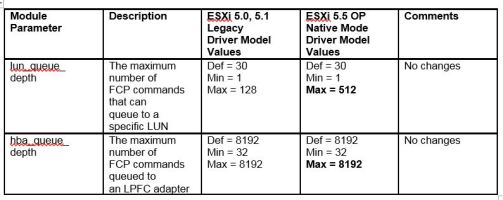
FC/FCoE Driver Configuration Parameters , Table 3-1, FC and FCoE Driver Parameters, lists the FC and FCoE driver module parameters, their descriptions, and their corresponding values in previous ESXi environments and in ESXi 5.5 native mode:
table
Excerpt from Table 3-1

Following Server Best Practices, with Emulex HBA in design (settings for Qlogic and Brocade differ), let’s assume we set
•    Host HBA queue depth to maximum
o    lpfc_hba_queue_depth : the maximum number of FCP commands that can queue to an Emulex HBA (8192)
•    LUN queue depth to maximum
o    lpfc_lun_queue_depth : the default maximum commands sent to a single logical unit (disk) (512)

KB 1267 talks about setting the queue depth for devices for QLogic, Emulex, and Brocade HBAs
Changing the queue depth for QLogic, Emulex, and Brocade HBAs (1267)
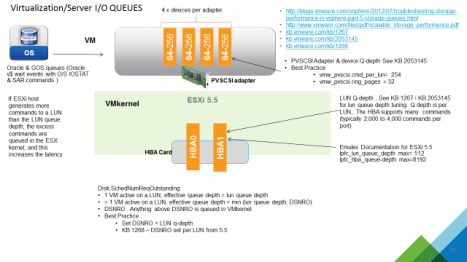
Fig 2
Figure 2 Illustration of Virtualization & Server Queues

Storage Stack
Figure 3 below is an example SAN layout showing an ESXi server with 2 single port Emulex HBA’s cards connected to a Storage array. Normally, there would only be a path from the ESX server to any given SP port (best practice).

For simplicity,
•    1 ESXi server in the server farm with a database having 1 LUN (LUN1) allocated to it
•    LUN1 is mapped to Port 0 of FA0 and Port 1 of FA1 card only
•    Array is an active-active array being able to send down IO’s down all storage ports.
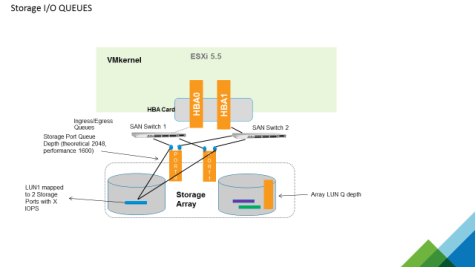
Fig 3

Figure 3 Illustration of Storage Queues

A specific Storage port queue can fill up to the maximum if the port is flooded with a lot of IO requests. The host’s HBA will notice this by getting queue full (QFULL) signal and will display very poor response times.

Older OS’s may experience a blue screen or freeze, newer OS’s will throttle IOs down to a minimum to get around this issue.

ESXi for example will reduce the LUN queue depth down to 1. When the number of queue full messages disappear, ESXi will increase the queue depth a bit until its back at the configured value. The overall performance of the SAN is fine but the host may experience issues, so to avoid it Storage Port queue depth setting must also be taken into account.

Following the Storage Best Practices, let’s assume we set
•    Maximum queue depth of all Storage Processor FC ports to 1600. (e.g. for EMC VNX, theoretical limit is 2048, performance limit is 1600)

We are not addressing the Ingress and Egress queues of the SAN switches which also needs to tweaked, refer to Chad’s excellent blog about the various queues)
VMware I/O queues, “micro-bursting”, and multipathing

Assumptions
•    A Database Workload Generator (Swing bench/SLOB) is used to generate IOPS
•    Database has 1 LUN (LUN1) allocated to it
•    1 ESXI server is issuing IO’s to LUN1
•    LUN1 is mapped to 2 Storage front end ports
•    Server has 2 Emulex Single port HBA’s
•    Average 10 ms latency between ESXi host and storage array
•    VMDK queue / PVSCI adapter queue increased to maximum (254/1024)
•    HBA queue depth is set to maximum allowed (8192)
•    Device lun-queue-depth is set to maximum allowed (512)
•    Storage port have their queue set to maximum (1600)
•    Active-Active Array

Queue Depth Calculation: A Physical Server perspective
Assuming average 10 ms latency between the host and storage array,

Number of IO commands which can be generated per LUN per sec with single slot queue length (1) = 1000ms / 10ms = 100
Max number of IOPS for a LUN with device queue set to maximum (512) = 100 x 512= 51,200

With another LUN with its lun-queue-depth set to maximum, Max number of IOPS with a 512 slot queue = 100 x 512= 51,200
…..
And so on…

Fig 5

Figure 3 Illustration of a LUN Queue Depth

Typically all LUNS are masked to both HBA cards for load balancing. With 2 HBA cards in play, each HBA card is masked to the same set of LUNs to avoid Single Point of Failure (SPOF), so number of LUNs which can be theoretically be supported by 2 Emulex HBA cards without flooding the HBA queue

Number of supported LUNs
= (HBA1 queue depth +   HBA2 queue depth) / (lun_queue_depth per lun)
= (8192 + 8192) / 512 = 16384 / 512 = 32 LUNS

Theoretically, the server can push 32 LUNs * 512 queue slots per LUN = 16384 IO’s per every 10ms (average latency) , WOW !!!

The DBA may be lulled into thinking that as long as he does not flood the HBA & LUN queue depths , setting all queues to maximum limits, he may be able to maximize throughput and push = 51200  IOPS per LUN * 32 LUNs = 1,638,400 IOPS

Let’s see if the SAN is capable of supporting the above requirement

Queue Depth Calculation: Perspective from a Storage SAN
As stated above, storage port queues can fill up to the maximum if the port is flooded with a lot of IO requests resulting in performance degradation.

In order to avoid overloading the storage array’s ports, the maximum queue depth of a Storage port is calculated using the below formula:

Port-QD ≥ Host1 (P * L * QD) + Host2 (P * L * QD) + … + Hostn (P * L * QD)

Where,
Port-QD = Maximum queue depth of the array target port
P = Number of initiators per Storage Port (number of ESX hosts, plus all other hosts sharing the same SP ports)
L = Number of LUNs presented to the host via the array target port ie sharing the same paths
QD = LUN queue depth / Execution throttle (maximum number of simultaneous I/O for each LUN any particular path to the SP)

Maximum number of LUNS which can be serviced by both the FC ports without flooding the FC storage port queue with lun queue depth=512 and heavy IO to the luns
= (Port-QD of 1st FA port 0 + Port-QD of 2nd FA port 1) / lun_queue_depth
= (1600 + 1600) / 512 = 6.25 ~ 6 LUNS

Other initiators are likely to be sharing the same SP ports, so these will also need to have their queue depths limited.

Typically a SAN will have at least 2 storage FA cards each with 2 storage ports which could support a lots of LUNs, so a QFULL situation may not arise that often if proper queue tuning is done

Given the server is able to send 16384 IO’s per 10 ms, the storage port has only 3200 (Both FA ports) slots and hence QFULL error condition will happen.

From the above calculation
•    Number of supported LUNs from an Application perspective (given lun-queue-depth = 512) is 32 LUNs
•    Actual number of LUNs which can be supported without flooding the Storage port queues is 6 LUNs

This difference is because there are queue restrictions on the storage end which also needs to be taken into account.

The storage admin would have the application owner throttle down the device lun-queue-depth to a small number, called Execution Throttling to avoid flooding the SP storage port queues.

Queue Depth Calculation: Virtualization Perspective
Let’s throw another wrench into the wheel here.

There is another perspective that needs to be taken into consideration, the virtualization stack.

Both the above 2 perspectives were from a pure physical stack perspective without any virtualization flavor.

With the virtualization stack in play, the number of outstanding disk requests to a LUN is determined by 2 parameters in the ESXi stack, Disk.SchedNumReqOutstanding (DSNRO) and the Lun queue depth.
The number of outstanding disk requests to a lun:
•    With only 1 VM sending active IO’s to a LUN
o    effective queue depth for that LUN = lpfc_lun_queue_depth
•    With > 1 VM sending active IO’s to a LUN
o    effective queue depth = minimum(lpfc_lun_queue_depth , DSNRO)

Best Practices is to set the DSNRO to the LUN queue depth to maximize throughput. So as per above example, DSNRO would have been set to 512 (LUN queue depth)

KB 1268 talks about setting the Maximum Outstanding Disk Requests for virtual machines
Setting the Maximum Outstanding Disk Requests for virtual machines (1268)

There are a couple of different throttling mechanisms that ESXi can use e.g. Adaptive Queueing, SIOC etc. You can read about them on Cormac’s blog below

Adaptive Queueing vs. Storage I/O Control

Lessons learnt
•    Keep the physical limitations of the Storage FA port queue into account when setting the lun queue depth for the database LUNs
•    Set Disk.SchedNumReqOutstanding (DSNRO) equal to the effective lun-queue-depth

Acknowledgements
Many thanks to Duncan Epping and Cormac Hogan for their valuable time in advising me on this blog post
Due credit should be given to Vas Mitra for prodding me to write about it, I thank him for his mentorship.

Posted in Oracle, VMware Hybrid Cloud | Tagged | Comments Off on Queues, Queues and more Queues

Book – “Virtualizing Oracle Business Critical Databases on VMware SDDC”

Updated Version – June 8, 2014

Virtualizing Oracle Business Critical Databases on VMware SDDC

https://www.amazon.com/Virtualize-Oracle-Business-Critical-Databases/dp/1500135127/ref=sr_1_1?s=books&ie=UTF8&qid=1493001047&sr=1-1&keywords=Virtualize+Oracle+Business+Critical+Databases


Virtualize Oracle Business Critical Databases (First Cut)

A important milestone in my life !!! My first book “Virtualize Oracle Business Critical Databases” which I co-authored , the paperback version hit Amazon stands on June 8, 2014.

This book is the definitive guide for teaching Oracle DBAs how to successfully virtualize a Tier one Business Critical Oracle database on VMware vSphere platform. Virtualization is the current market trend owning to the numerous benefits it brings to the table and VMware is the industry leader around virtualization and cloud solutions.The book written from an Oracle perspective will teach Oracle DBAs the insights and best practices for deploying Oracle workloads in a virtualized environment. This book contains key insights and knowledge gained by the industry leaders around deploying Oracle Tier one solutions on a vSphere environment.

Book website is http://db-aas.com/

Custom Release 1.1 for VMWorld 2014:
The authors due to popular demand have agreed to release an updated version of this book for VMWorld 2014. This release has numerous additional best practices, words of wisdom as well as in-depth technical insights. Our goal is to have this book continue to be the definitive guide for virtualizing mission critical Oracle databases and applications. We look forward to sharing these new level of insights gained from real world experiences.

Posted in Oracle, VMware Hybrid Cloud | Comments Off on Book – “Virtualizing Oracle Business Critical Databases on VMware SDDC”

VMware PEX (Partner Exchange) 2014

Partner Exchange(PEX) 2014 kicked off on February 8th week end with VMware HOL(Hands on Labs) and Boot camp. We had our first BCA (Business Critical Application) Workshop over the week end.

It was an abridged version of the 3 day intensive “BCA Live Fire” as its known, with technical low level, deep dive. This event covers the major BCA verticals : Java, SAP, Oracle, SQL Server, Exchange with lab exercises.

Around 25-30 participants attended both days. Since this was a partner event, we wanted it more partner driven and partner empowering, so we left the agenda completely flexible at the partner’s comfort level. We were however able to complete the slide deck along with the lab exercises and debated discussions.

Java and SAP module featured the first day. The second day featured around Oracle & SQL.

We had a lab exercise introduced before the lunch break and the participants had an hour during lunch to think about the solutions. we had them split up into 4 groups and each group had to come up with a solution which they had to present before the audience.

The lab exercise were focused on VM design keeping Best Practices including vCPU, Memory Reservations, NUMA, Storage placement, SCSI controllers, Oracle Licensing , Workload management etc in mind.

We were amazed with the creativity and uniqueness of the solution each group came up with. We then discussed each group’s solution , the pros and cons.

We ended the day on a high note with Oracle HA, DR, Backup and Recovery, Migration Strategies best practices.

It took our team a month to work on the material full time for all the modules, it was a labor of love and boy, were we vindicated:) We got the highest rating !!

We will not be presenting this material during the 3 day intense BCA Live fire across the Americas, APJ, EMEA. I will be on the road starting May onwards to cover the Oracle module along with my colleagues.

Looking forward for that

Posted in Oracle, VMware Hybrid Cloud | Comments Off on VMware PEX (Partner Exchange) 2014

Setting Multi Writer Flag for Oracle RAC on vSphere without any downtime

Oracle RAC Cluster using ASM for storage would require the shared disks to be accessed by all nodes of the RAC cluster.

The multi-writer option in vSphere allows the VMFS-backed disks to be shared by multiple VM’s simultaneously. By default, the simultaneous multi-writer “protection” is enabled for all .vmdk files ie all VM’s have exclusive access to their .vmdk files. So in order for all of the Oracle RAC VM’s to access the shared vmdk’s , the multi-writer protection needs to be disabled.

KB Article 1034165 provides more details on how to set the multi-writer option manually to allow VM’s to share vmdk’s (link below).

The above method would require the VM’s to be powered off before the multi-writer option can be set in the .vmx configuration file. This means that the Oracle RAC instance would have to be shutdown and the VM completely powered off before the option can be set leading to an Instance outage.

Oracle DBA’s would rather a method where they could add shared disks on the fly to a running Oracle RAC cluster without any downtime.

A colleague and I working for VMware PSO some time back (now I have moved under the Global Center Of Excellence group ) wrote a POWERCli script called the “addSharedDisk” which adds a new shared disk to the existing Oracle RAC nodes along with setting the multi-writer flag setting , setting the disks as independent-persistent and eager-zero thick formatting.

This script can be used to add shared disk on the fly while the Oracle RAC Clusters is up and running thus avoiding any outage.

Disclaimer:
– This is an generic script provided and can be customized as per your requirement
– This script is provided for educational purposes only , please use at your own risk
– No Support will be provided for this script
– All values provided in this script is for example only, you would need to provide real values

This script accepts at the command prompt
– The number of shared disks to be created( maximum 55)
– The number of nodes that you need this shared disk be added to

Currently
-the script places all shared VMDK files in the same datastore as the boot disk VMDK files. This can be customized to place shared vmdk’s on different datastores for IO load balancing
-the script can be further customized to place vmdk’s on different SCSI controllers.
-the script has the logic to check the network requirements of the Oracle RAC interconnect adapters(assumption of the script is 2 Private Adapters are deployed per VM) . (can be removed or commented out if not required)

The script can be found in the link below [https://communities.vmware.com/docs/DOC-24873]

Posted in Oracle, VMware Hybrid Cloud | Comments Off on Setting Multi Writer Flag for Oracle RAC on vSphere without any downtime