VMworld 2018 Oracle Customer Bootcamps

Architecting Oracle Workloads on VMware Technologies 

On a mission to arm yourself with the latest knowledge and skills needed to master virtualizing Oracle on VMware Software Defined Data Center (SDDC) along with moving workloads to the VMware Cloud on AWS ?


VMworld Customer bootcamps can get you in shape to lead the virtualization charge in your organization, with Instructor-led demos and In-depth course work designed to put you in the ranks of the IT elite.

Oracle on vSphere
The Oracle on VMware SDDC Bootcamp will provide the attendee the opportunity to learn the essential skills necessary to run Oracle implementations on VMware SDDC with a well defined journey to running the same Oracle workloads on VMware Cloud on AWS.

The best practices and optimal approaches to deployment, operation and management of Oracle database and application software will be presented by VMware expert Sudhir Balasubramanian , Oracle Practice lead, who will be joined by other VMware and Industry Experts.

This technical workshop will exceed the standard breakout session format by delivering “real-life,” instructor-led, live training and incorporating the recommended design and configuration practices for architecting Business Critical Databases on VMware SDDC  infrastructure and VMware Cloud on AWS.

Subjects such as running Oracle workloads e.g Single Instance / Real Applications Clusters (RAC) using Automatic Storage Management (ASM) on vSphere 6.7 with all the new features like Para Virtualized RDMA , Persistent Memory etc , HCI vSAN , VAIO , VVOL, NSX etc as well as running Oracle workloads on VMware Cloud on AWS will be covered in depth.

Learn More

https://www.vmworld.com/en/us/learning/sessions.html#workshops

https://my.vmworld.com/widget/vmware/vmworld18us/uscatalog?search=&search.sessiontype=1519781576201001xNZQ


Details

Cost: $800 / seat

Schedule:
Sunday August 26, 2018
8:00am to 5:00pm
(registration opens at 6:30am)

Location:
Mandalay Bay, South Convention Centre
Level 2 , Room Number (will be posted as soon as it is made available)

Registration

Be sure to add the Bootcamp in step 4 of your VMworld conference registration, under Educational Offerings, after you’ve selected your conferences pass.

Registration is open, seating is limited! Lunch and breaks provided.

Looking forward to seeing you all there!

Posted in Oracle, VMware Hybrid Cloud | Comments Off on VMworld 2018 Oracle Customer Bootcamps

Migrating an Oracle RAC Cluster using Storage vMotion to vSAN Storage – Private Investigation

Migrating an Oracle RAC Cluster using Storage vMotion to vSAN Storage – Private Investigation


” Give me ten men like Clouseau, and I can destroy the world…” said Former Chief Inspector Dreyfus about Inspector Jacques Clouseau and his incompetence, clumsy and chaotic detective skills


This blog will not focus on the ‘how to perform Storage vMotion” aspect of the entire process, it will focus on what we uncovered during our investigations (sans the incompetence, clumsiness and chaos that followed Inspector Jacques Clouseau) into Storage vMotioning a Oracle RAC cluster to vSAN Storage.

The Around the “Storage World” in no time – Storage vMotion and Oracle Workloads  blog  focused on how we can storage vMotion an Oracle RAC Cluster from one storage to another without ANY downtime.

The blog Migrating non-production Oracle RAC using VMware Storage vMotion with minimal downtime focused on on storage vMotion of a 2 Node non-production Oracle RAC Cluster with storage on one datastore to a datastore on a different storage system with minimal downtime and time.

You can read more about it here.

Posted in Oracle, VMware Hybrid Cloud | Comments Off on Migrating an Oracle RAC Cluster using Storage vMotion to vSAN Storage – Private Investigation

Migrating non-production Oracle RAC using VMware Storage vMotion with minimal downtime

Migrating non-production Oracle RAC using VMware Storage vMotion with minimal downtime


Much has been discussed and documented about Storage vMotion of Oracle RAC Clusters on VMware SDDC which can be found in the numerous blog posts available at Oracle on VMware Collateral – One Stop Shop.


Development, QA , Pre-Production  RAC clusters form an important part of any RAC deployment environment and while they may not be as large as the production RAC clusters, they are deemed equally critical for the software life cycle process . Fortunately they are not constrained by the 100% uptime business SLA’s which means admins can choose to go another route of storage vMotioning Oracle RAC with minimal downtime in a very short time.

This blog focuses on storage vMotion of a 2 Node non-production Oracle RAC Cluster with storage on one datastore to a datastore on a different storage system with minimal downtime and time.

Let’s us first review some key ideas, including the deployment model of Oracle on vSphere and the fundamentals of Storage vMotion.

You can read more on it here.

Posted in Oracle, VMware Hybrid Cloud | Comments Off on Migrating non-production Oracle RAC using VMware Storage vMotion with minimal downtime

Introducing vSphere 6.7 for Enterprise Applications

vSphere 6.7 introduces new storage and networking features which have a major impact on the performance of  Enterprise Applications – these include support for Persistent Memory (PMEM) and enhanced support for Remote Directory Memory Access (RDMA).


Persistent Memory (PMEM)

With vSphere Persistent Memory (PMEM) , customers using supported hardware servers, can get the benefits of ultra-high-speed storage at a price point closer to DRAM-like speeds at flash-like prices.

The following diagram shows the convergence of memory and storage.
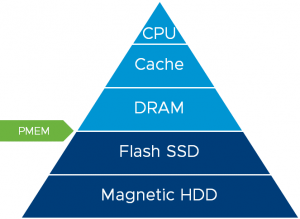


Technology at the top of the pyramid (comprised of DRAM and the CPU cache and registers) have the shortest latency (best performance) but this comes at a higher cost relative to the items at the bottom of the pyramid.    All of these components are accessed directly by the application – also known as load/storage access.

Technology at the bottom of the pyramid – represented by Magnetic media (HDDs and tape) and NAND flash (represented by SSDs and PCIe Workload Accelerators) have longer latency and lower costs relative to the technology at the top of the pyramid.  These technology components have block access meaning data is typically communicated in blocks of data and the applications are not accessed directly.

PMEM is a new layer called Non-Volatile Memory (NVM) and sits between NAND flash and DRAM, providing faster performance relative to NAND flash but also providing the non-volatility not typically found in traditional memory offerings.  This technology layer provides the performance of memory with the persistence of traditional storage.

Enterprise Applications can be deployed in virtual machines which are exposed to PMEM datastores.  PMEM datastores are created from NVM storage attached locally to each server. Performance benefits can then be attained as follows:

  • vSphere can allocate piece of the PMEM datastore and present it to the virtual machine as a disk -virtual persistent memory disk which is used as an ultra-fast disk. In this mode no guest-OS or application change is required.
  • vSphere can allocate a piece of the PMEM datastore in a server and present it to a virtual machine as a virtual NVDIMM. This type of virtual device exposes a byte addressable persistent memory to the virtual machine.
    • Virtual NVDIMM is compatible with latest Guest Operating Systems which support persistent memory. Applications do not change and experience faster file access as the modified OS filesystem bypasses the buffer cache.
    • Applications can be modified to take advantage of PMEM and experience the highest increase in performance via direct and uninterrupted access to hardware.

Applications deployed on PMEM backed datastores can benefit from live migration (VMware vMotion) and VMware DRS – this is not possible with PMEM in physical deployments.


Remote Directory Memory Access (RDMA)

vSphere 6.7 introduces new protocol support for Remote Direct memory Access (RDMA) over Converged Ethernet, or RoCE (pronounced “rocky”) v2, a new software Fiber Channel over Ethernet (FCoE) adapter, and iSCSI Extension for RDMA (iSER). These features enable customers to integrate with even more high-performance storage systems providing more flexibility to use the hardware that best compliments their workloads.

RDMA support is enhanced with vSphere 6.7 to bring even more performance to enterprise workloads by leveraging kernel and OS bypass reducing latency and dependencies.  This is illustrated in the diagram below.
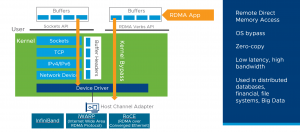


When virtual machines are configured with RDMA in a pass thru mode, the workload is basically tied to a physical host with no DRS capability i.e. no ability to vMotion. However customers who want to harness the power vMotion and DRS and still experience the benefits of RDMA , albeit at a  very small performance penalty can do so – with para virtualized RDMA software (PVRDMA). With PVRDMA, applications can run even in the absence of an Host Channel Adapter (HCA) card.  RDMA-based applications can be run in ESXi guests while ensuring virtual machines can be live migrated.

Use cases for this technology include distributed databases, financial applications, and Big Data.

This blog was also posted here.

More on vSphere 6.7 New features can be found here .

All Oracle on vSphere white papers including Oracle licensing on vSphere/vSAN, Oracle best practices, RAC deployment guides, workload characterization guide can be found at Oracle on VMware Collateral – One Stop Shop

This blog was authored by Sudhir Balasubramanian and Vas Mitra.

Posted in Oracle, VMware Hybrid Cloud | Comments Off on Introducing vSphere 6.7 for Enterprise Applications

A Journey to the Clouds – Oracle on VMware Cloud on AWS

We have nothing to fear but …”. famous words of Chief Vitalstatistix , chief of the famous Gaulish village in the famous Asterix & Obelix series.


Legend goes when the Gallic chieftains were asked by Alexander the Great what they were most afraid of in all the world, they replied that their worst fear was that the “sky might fall on their heads”.

In today’s world, the “sky” aka Cloud is the platform for bursting and sustaining application workloads with Cloud service providers offering network services, infrastructure, or business applications in the cloud, thereby helping with kicking off new projects or helping meet business needs for temporary, seasonal, or unplanned demand.

More information about it can be found here.

Posted in Oracle, VMware Hybrid Cloud | Comments Off on A Journey to the Clouds – Oracle on VMware Cloud on AWS

Storage vMotion for Production Oracle RAC Workloads with NO downtime – Same vSphere Cluster , Different Storage Array

Around the World in Eighty Days” – A classic adventure novel and one of Jules Verne’s most acclaimed works which describes how Phileas Fogg and his valet Passepartout attempt to circumnavigate the world in 80 days on a wager.


In the world of Business Critical Applications, especially IO intensive Oracle workloads, there is always a need for storage migration, based on the ever demanding workload profile.


For example –

  • Migrate Oracle database storage from one Tier to another Tier within a storage array , accessed by the same vSphere Cluster
  • Migrate Oracle database storage from one array to another array (within and between data centers) for the same datastore type [ VMFS . NFS, iSCSI , vVOL , vSAN] ,accessed by the same vSphere Cluster
  • Migrate Oracle database storage from one array to another array (within and between data centers) across different datastore types [ VMFS . NFS, iSCSI , vVOL , vSAN] , accessed by the same vSphere Cluster


The storage migration is made seamless across the various permutations and combinations, simply by using vmdk’s , the common  denominator of VM storage across all above flavors of VMware datastores.


This article describes how storage migration can be performed for Oracle database running on VMware vSphere, for any types of underlying storage.  The migration is done using a combination of two key technologies depending on the database deployment model

  • VMware Storage vMotion
  • Oracle Automatic Storage Management (ASM).


Before describing this technique, we first review some key ideas, including the deployment model of Oracle on vSphere and the fundamentals of Storage vMotion


This blog  focused on how we can storage vMotion an Oracle RAC Cluster , from one datastore to another datastore within a storage array OR between 2 storage arrays, accessed by the same vSphere Cluster , without ANY downtime.


Key Takeaways


  • Storage Migration of an Oracle RAC Cluster from one datastore to another datastore , within an storage array OR between 2 storage arrays, on a VMware SDDC , is challenging as Oracle RAC VM’s uses shared vmdk/s for RAC database. and VMware storage vMotion alone cannot be used as explained below.
    • VMware storage vMotion will migrates ALL vmdk’s including Oracle database ASM disk, Operating System and Oracle binaries vmdk but will not storage vMotion clustered vmdk’s, it can ONLY be used for non-shared vmdk’s [KB 1034165]
    • Oracle Automatic Storage Management (ASM) technology will ONLY migrate Oracle database ASM disk BUT will NOT migrate the Operating System or Oracle binaries vmdk.
  • This blog  focused on how we can storage vMotion an Oracle RAC Cluster without ANY downtime.
  • We deploy a two-step process which combines both Oracle ASM and storage vMotion technology as detailed above
    • Using Storage vMotion technology to migrate OS and Oracle non-clustered vmdk’s of RAC VM’s – The OS and Oracle binaries vmdk’s for the RAC VM’s are now migrated from one datastore to new datastore on an existing array or between 2 arrays
    • Using Oracle ASM technology to migrate cluster database data – RAC database can been migrated from one datastore to new datastore on an existing array or between 2 arrays


Before describing this technique, we first review some key ideas, including the deployment model of Oracle on vSphere and the fundamentals of Storage vMotion.


Continue reading

Posted in Oracle | Comments Off on Storage vMotion for Production Oracle RAC Workloads with NO downtime – Same vSphere Cluster , Different Storage Array

Oracle on VMware Cloud on AWS – Unraveling the licensing myth

With the recent launch of VMware Cloud on AWS from VMware, many Business Critical Application (BCA) workloads that were previously difficult to deploy in the cloud no longer require significant platform modifications.  VMware Cloud on AWS, powered by VMware Cloud Foundation, integrates VMware flagship compute, storage, and network virtualization products—VMware vSphere, VMware vSAN, and VMware NSX—along with VMware vCenter Server management. It optimizes them to run on elastic, bare-metal AWS infrastructure.

VMware and AWS presented a Better Together demonstration at VMworld 2017 using an Oracle RAC Database for high-availability zero-downtime client connection failover, supporting a Django-Python application running in a Native AWS Elastic Beanstalk environment.  This illustrates the further value you can take advantage of by choosing VMware Cloud on AWS as the public cloud infrastructure for your Oracle RAC implementations.

The following topics are covered in this blog post in the following order –

  • VMware Cloud on AWS –Initial availability model
  • Understanding Oracle Licensing on VMware vSphere / vSAN environments
  • Deploying Oracle Workloads on VMware environments
  • What’s New September 6th, 2018 (SDDC Version 1.5) – ‘Compute Policies’
  • New Feature announced on September 10th, 2018 – Three Host SDDC
  • Facts about the Single Host SDDC
  • vSphere Tags and Attributes
  • Affinity rules in VMware Cloud on AWS
  • Understanding Oracle Licensing on the VMware Cloud on AWS

Key Points to take away from this blog

Oracle licensing does not change from a licensing perspective, whether you run Oracle workloads on a classic vSphere environment, Hyper-Converged Infrastructure solution like vSAN, or VMware Cloud on AWS.

Continue reading
Posted in Oracle | Comments Off on Oracle on VMware Cloud on AWS – Unraveling the licensing myth

VMware Snapshots and Oracle non-clustered Independent Persistent disks

“To beat (something) to boredom” – To linger over or discuss something so long and to such a tedious and laborious extent that the subject is no longer of any interest or relevance and induces a bad migraine!!!

Yes, much has been written and spoken about and VMware Snapshots and Independent Persistent disks but I still get questions from customers and field regarding that, so yes, this is yet another blog to attempt to explain this in detail.


Key points to take away from this blog

Given a VM’s with non-shared dependent  and non-shared independent-persistent vmdk’s, taking a VMware snapshot will result in

  • VMware snapshot for dependent vmdk’s
  • VMware snapshot operation will ignore the independent-persistent vmdk’s

More information about it can be found here.

Posted in Oracle, VMware Hybrid Cloud | Comments Off on VMware Snapshots and Oracle non-clustered Independent Persistent disks

Around the “Storage World” in no time – Storage vMotion and Oracle Workloads

Around the World in Eighty Days” – A classic adventure novel and one of Jules Verne’s most acclaimed works which describes how Phileas Fogg and his valet Passepartout attempt to circumnavigate the world in 80 days on a wager.


In the world of Business Critical Applications, especially IO intensive Oracle workloads, there is always a need for storage migration, based on the ever demanding workload profile. For example,

  • Migrate storage from one Tier to another Tier within a storage array
  • Migrate storage from one array to another array (within and between datacenters)

This approach is independent of whether those workloads are virtualized or not. The end goal is to ensure that the underlying storage architecture can provide and sustain the demanding needs of the Application.

This article describes how storage migration can be performed for Oracle database running on VMware vSphere, for any types of underlying storage.  The migration is done using a combination of two key technologies, VMware Storage vMotion and Oracle Automatic Storage Management (ASM) depending on the database deployment model.

Before describing this technique, we first review some key ideas, including the deployment model of Oracle on vSphere and the fundamentals of Storage vMotion.

More information about it can be found here.

Posted in Oracle, VMware Hybrid Cloud | Comments Off on Around the “Storage World” in no time – Storage vMotion and Oracle Workloads

Oracle on vSphere – Summary of Storage options

Storage – the final frontier. These are the voyages of any Business Critical Oracle database, its endless mission: to meet the business SLA, to sustain increasing workload demands and seek out new challenges, to boldly go where no database has gone before.


Storage is one of the most important aspect of any IO intensive workloads, Oracle workloads typically fit this bill and we all know how a mis-configured Storage or incorrect tuning often leads to database performance issues, irrespective of any architecture where the database is hosted on.

As part of my pre-sales Oracle Specialist role where I talk to Customers , Partners and VMware field, I always bring up the fact how we can go and procure ourselves the biggest and baddest piece of infrastructure on this face of earth and all it takes is one incorrect setting or mis-configuration and  everything goes to “Hell in a Handbasket”.


Continue reading

Posted in Oracle, VMware Hybrid Cloud | Comments Off on Oracle on vSphere – Summary of Storage options